Nivra: Turning a Hackathon Idea into a WebMCP Architecture Workspace
Hackathons usually start with a dangerous question: what can I build quickly?
I don't like that question very much. It sounds practical, but it pushes you toward the wrong kind of demo: a screen, a button, a little AI, and the feeling that something product-shaped exists. For a normal hackathon, maybe that is enough. For the OpenAI WebMCP Challenge, it wasn't.
The better question was narrower:
What idea actually shows why WebMCP should exist?
Not "how do I add AI to an app." Not "how do I put a chat panel next to a UI." I mean: where does an agent need to read the state of the application, move through the same workspace as the human, act on the same model, and help expose something that would otherwise stay hidden between layers of the system?
That question became Nivra.
Links for the project:
- Live app: nivra-psi.vercel.app
- GitHub repository: github.com/MaximusFT/nivra
- Demo video: YouTube
The first ideas were not architecture
At the beginning, I did not have the project. I had several possible directions, and we rejected most of them for reasons that were more useful than the ideas themselves.
One strong candidate was Senwia Sleep Lab, an evolution of an app idea I had around sleep analysis. I still like that direction. Sleep is understandable. The data can be visual. An AI agent could explore patterns with the user, highlight anomalies, ask questions, and help connect habits with outcomes.
But for this challenge, it had a weak point. To make the demo convincing, I would have needed a synthetic data layer: fake sleep history, fake events, fake metrics. WebMCP would have interacted with data I had invented for the demo. The product might have been interesting, but WebMCP would not have been the reason it worked.
There were other options too. Interview Forge, an AI tool for technical interviews. AI Newsroom, a system for processing and organizing news. And then an architecture workspace: a place where a human architect and an AI agent could work together over a structured model of a software system.
That last idea kept surviving the cuts.
Not because architecture sounds more serious. Because WebMCP was not decorative there. If an agent is working with architecture, it needs to inspect application state, move between views, find dependencies, show evidence, add findings, create proposals, and work inside the same workspace the architect is looking at.
That is a different product shape. WebMCP stops being a chat next to a diagram. It becomes the agent's interface into the architecture model.
ArchPilot was the wrong name, usefully
The first working name was ArchPilot.
It sounded fine at first. Short, obvious, close enough to architecture and agent-assisted work. Then we checked the market and found existing products with similar names, including products in software architecture and architecture governance.
So the name had to go.
That could have been just a naming problem. It turned into a product decision.
When a name stops working, you have to ask what you were actually trying to name. And that forced a clarification: Nivra should not be "AI designs architecture for you." It should not be an architecture validator that stands above the system and declares what is correct. It should not be a governance platform. And it definitely should not be a chat box glued to the side of a diagram.
I needed a different sentence:
Architecture is the shared context.
That became the center of Nivra.
The human and the AI agent work with the same structured architecture model, but through different interfaces. The human sees a visual workspace. The agent gets access to the same model through WebMCP tools. One source of truth. Two ways to reason over it.
The demo needed a real architectural tension
Once the product shape was clear, the next problem was the scenario.
I did not want a toy example where service A talks to service B and the whole point is that the arrow is bad. That kind of demo teaches the user to agree with the author, not to inspect the system.
The scenario became Commerce Platform.
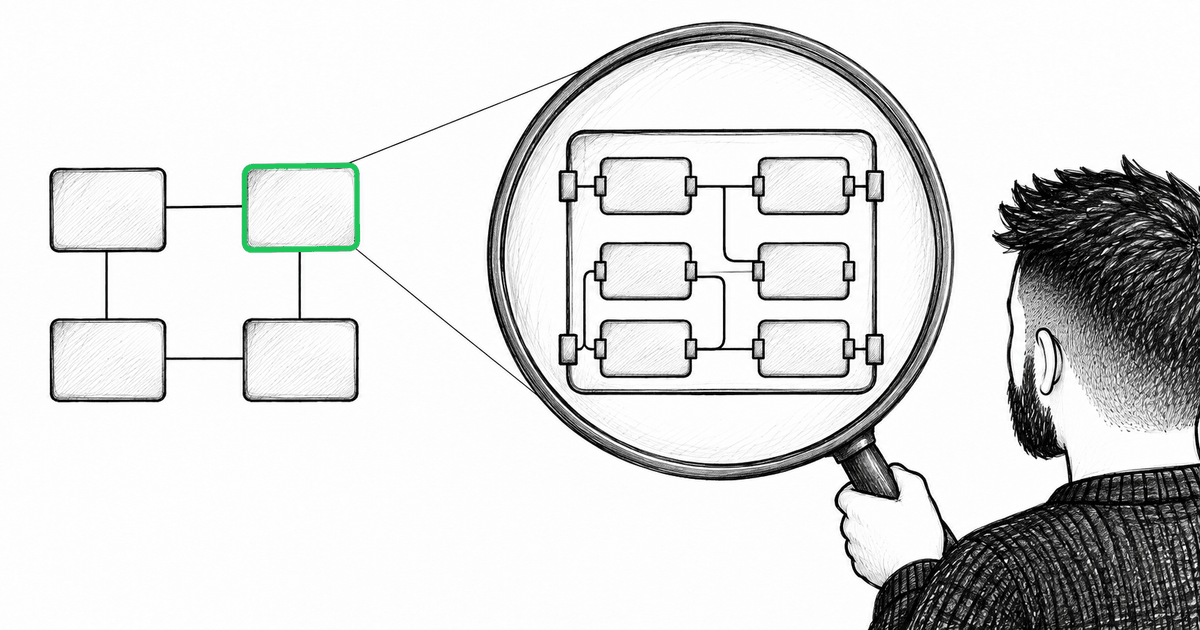
At the High-Level Design level, everything looks almost right. Product, Cart, Checkout, and Account are separated into microfrontends. Checkout looks independent. You can draw a box around it and say, quite reasonably, "this is a separate part of the system."
Then the business requirement lands: the Checkout Team needs to evolve and deploy Checkout independently from Product.
The natural reaction is understandable:
Checkout is already a separate microfrontend. Why wouldn't it be independently deployable?
That is exactly where Nivra needed to become useful.
At HLD, Checkout looks ready. But when the agent moves deeper into Checkout LLD, two dependencies appear, and they are not the same kind of problem.
The first is Basket Adapter -> Product Store through shared runtime state. That is runtime coupling. Checkout may be visually separate, but it still depends on Product state at runtime.
The second is Pricing Module -> Product Service through an explicit REST API. That is also a dependency, but it is visible, named, and easier to reason about. An architect may decide it is acceptable for now.
That distinction became the core of the demo:
A separate box on a diagram doesn't mean an independent system.
I did not want Nivra to say "all dependencies are bad." That is not architecture. The useful moment is when the human sees the evidence, understands the difference between shared runtime state and an explicit contract, and makes a trade-off.
The agent does not decide for the architect. It helps expose the layer where the decision actually lives.
The canvas could not be the source of truth
After the scenario clicked, we designed the product architecture around it.
The most important decision was boring on purpose: do not start with the diagram.
If the first thing you build is a React Flow canvas, it is very easy to confuse the graph with the architecture. The nodes on the screen start to feel like the system. Coordinates acquire meaning. Views drift into their own copies of elements. Then validation, WebMCP, and UI each interpret the "architecture" slightly differently.
So the first real artifact was a plain TypeScript Architecture Model. Commerce Platform v1.35 became a deterministic fixture model, not a decorative picture. HLD and Checkout LLD referenced the same entities and relations. Views stored IDs, not duplicated elements. Layout lived separately, because canvas coordinates are presentation metadata, not architectural meaning.
That decision paid for itself later. UI, validation, and WebMCP could all work against the same model independently. If the canvas changed, the architecture still existed. If the visual language changed, the domain model did not move with the pixels.
The plan came before the code
After the product idea settled, we still did not jump straight into implementation.
First came the Product Definition and MVP scope. Then Architecture Levels and the Domain Model. Then the WebMCP Tool Contract, UI/UX, technical implementation notes, demo fixture, golden scenario, seven-day implementation plan, and visual design specification.
All of that became Nivra Master Specification v1.1.
At that moment, Nivra still was not an application. But it was no longer just an idea. It had a scenario, a domain model, a WebMCP contract, a UI direction, a demo fixture, and a development plan.
The question changed.
It was no longer: what should we build?
It became: can we make this model actually work?
Foundation first, WebMCP later
Once the master specification existed, the temptation was obvious: start with tools. This was the WebMCP Challenge, after all. Show WebMCP.
But that would have been the wrong order.
We started with React, TypeScript, and Vite, but the real output of the first phase was not a screen. It was the Architecture Model and the operations around it.
Only then came the canvas, adapters from the Architecture Model into React Flow, and navigation from Commerce HLD into Checkout LLD.
That became Checkpoint A: does the product create a "now I see it" moment without the agent telling the user what to think?
At HLD, Checkout looked separate. In LLD, the shared runtime state dependency and the explicit REST call appeared together. The relations had different visual and semantic treatments. The product idea finally stood on the workspace itself, not on narration around the demo.
If a demo only works while I am explaining it out loud, the product does not work yet.
The first serious bug was not where I expected
The early version compiled. Then a browser smoke test immediately found a React maximum update depth problem, effectively an infinite render.
The cause was not the Architecture Model. It was an object-returning Zustand selector. The selector created a new object, React treated it as a new value, the component updated, the selector created another new object, and the loop continued.
The fix was ordinary: stable comparison with useShallow.
The lesson was larger than the fix. Even a foundation screen cannot be considered successful just because TypeScript is satisfied. The browser has its own failure modes: selectors, subscriptions, effects, render timing. If an architecture workspace is supposed to be trustworthy, it needs to be exercised in a live UI early.
Around the same time, another risk became obvious: the canonical fixture could not be mutated directly. If future write actions could silently change Current Architecture, the whole proposal story would lose credibility. Changes had to be immutable. Current Architecture had to remain the reference point.
That sounds like an implementation detail, but it is really a product detail. The user has to know what they are looking at: the current system, or a proposed alternative.
The reasoning loop had to work manually first
Before registering any WebMCP tools, we made the manual scenario work end to end.
The architect selects evidence, opens the Context Panel, sees relations and deployment information, creates a Finding, saves architectural constraints, runs deterministic validation, creates a Proposal, compares Current and Proposal, and validates the alternative.
That was Checkpoint B: the full manual Observe -> Question -> Inspect -> Understand -> Decide -> Propose -> Verify loop.
This is where the product became clearer to me: validation was not the main product.
Validation matters. Without it, the whole thing becomes a nice story. But Nivra is not centered on pass/fail. It is centered on shared understanding. The agent can help inspect, explain, drill into LLD, and propose changes. But once a rule is formalized, boring deterministic code should check it.
Agent-assisted reasoning. Deterministic verification.
Constraints needed evidence
We added four rule types: forbidden-dependency, independent-deployment, no-cycles, and allowed-protocol.
Validation was pure, typed, and evidence-bearing. Each check returned not only pass/fail, but references to the elements or relations that explained the result.
Golden Current Architecture returned 2 passed / 2 failed.
Honestly, that was better than making the demo pass perfectly from the beginning. If Current passes every rule, validation proves very little. It might just be confirming a happy path written for the demo. The 2/2 result showed that the rule was actually finding the hidden violation.
Some details mattered. A forbidden dependency has to account for descendants, not only exact IDs. LLD elements inherit deployment unit through the parent hierarchy. Protocol comparison is case-insensitive, even if the display model says REST. Validation does not create Findings, and it does not depend on React, Zustand, or the canvas.
An architecture rule should validate architecture, not whatever the UI happens to be rendering.
Proposal, not mutation
The next problem was trust.
If an agent can "fix" the architecture directly, the human loses the ability to understand the original state. What was Current? What did the agent propose? What has been accepted? What is still just an alternative?
So Current Architecture stayed immutable. A Proposal became a patch-based alternative with base version checking.
In the golden proposal, the runtime state dependency is removed and replaced with a Checkout Snapshot Contract. Not as a magical fix, but as a checkable architectural alternative.
The visual diff needed thought too. The added Snapshot Contract and the removed Product Store/runtime relation had to be visible at the same time. The effective Proposal view had to be computed from the patch, not stored as a separate diagram, because otherwise we would be back to two competing models instead of one source of truth.
The result:
Current: 2 passed / 2 failed.
Proposal: 4 passed / 0 failed.
That felt like architecture work. The human can see the trade-off, inspect the evidence, and evaluate a verified alternative before accepting anything.
The agent doesn't draw architecture for you. It reasons inside your architecture with you.
WebMCP as an adapter boundary
Only after manual Checkpoint B did we start the WebMCP integration.
That order mattered. WebMCP tools did not get their own architecture model. They did not mutate React Flow directly. They became a browser adapter over existing workspace operations. The human interface and the agent interface called the same logic.
The first group of tools covered reading and navigation: get_architecture, inspect_element, and show_architecture_view.
Then came write and compute tools: annotate_architecture, add_constraint, create_proposal, and validate_architecture.
Seven P0 tools in total.
On paper this sounds simple: write a JSON Schema, register a handler, done. In practice, the boundary was more interesting. The runtime can call a handler more than once. It can pass malformed data. It can send an ID that looks plausible but breaks the model. So the write tools also validate stable kebab-case IDs, enums, evidence references, duplicate and conflicting IDs, parent references, relation endpoints, proposal base version, and nested update values.
Every call creates an activity entry with running, success, or error status. The human can see what the agent actually did in the workspace. But activity is not persisted as architecture state.
That separation matters. Agent activity explains the process. It is not the architecture.
Experimental API means experimental
WebMCP was an experimental browser API available through a specific Chromium mode. A normal browser might not have document.modelContext. That could not be treated as the whole app failing.
So Nivra got an explicit WebMCP ready / WebMCP unavailable status, a guarded legacy fallback for earlier preview runtimes, AbortSignal-based registration, a complete manual fallback without WebMCP, and a guided demo simulation for cases where an external agent is not available.
The honesty of that simulation mattered.
It is labeled Demo simulation. It uses the same workspace actions and shows the same operations, but it does not pretend to be real AI. Challenge V1 is a client-side application. Not a production AI backend. Not real-time collaboration. Not a governance platform.
It is a verifiable workspace where WebMCP has a clear role when the runtime is available, and the product still works when the runtime is not.
Unit tests do not prove a browser tool works
Unit tests protected domain queries, adapters, validation, persistence, store actions, and tool input validation.
That was necessary. It was not sufficient.
A handler test does not prove that the browser registered a WebMCP tool. It does not prove that transport reached a workspace action. It does not prove that the human saw the result in the UI.
So we built a black-box harness: npm run test:webmcp.
It starts an isolated Vite server, launches a temporary Chromium profile with WebMCP enabled, discovers all seven tools, and calls them through browser ModelContext.executeTool(). Every run starts from Reset Demo. The harness intentionally repeats Finding, Constraint, and Proposal writes, checks DOM focus and Agent Activity, validates Current and Proposal, returns to Current, and confirms that the original basket-adapter-shares-product-store relation is still there.
Three full repetitions returned the same result.
That was Checkpoint C: Current 2/2 -> Proposal 4/0. Current stayed unchanged. Retries were idempotent. Activity was visible. No errors.
That finally felt like evidence. Not "it clicked locally." Not "the handler returns JSON." The full chain worked: WebMCP registration -> browser transport -> workspace action -> visible React state.
Polish was not about making it pretty
After functional freeze, we did not expand scope. We asked a different question: can someone understand the story without me narrating it?
The answer was: not quite yet.
HLD/LLD navigation could not look like unrelated tabs. Selecting an element had to open its own context, not accidentally show Checkout policy. Proposal action should not appear before Current validation exposes a problem. Added and removed evidence needed to be visible together. Agent Activity had to be readable without taking over the workspace. The standalone demo could not pretend it had a live agent connection.
So we moved toward contextual drill-down and breadcrumb navigation. We added a neutral Policy state without selection, scoped Checkout policy, timeline Agent Activity, guided demo, and a dismissible history drawer.
After successful Proposal validation, the workspace also got an implementation brief and the ability to save a Proposal as an architecture branch.
Important detail: architecture branch is not a Git branch. It is a durable verified alternative inside Nivra. current/commerce-1.35 and proposal/checkout-isolation can be compared without overwriting Current.
The visual verification was practical: desktop layouts at 1440x900 and 1920x1080, no horizontal overflow, readable Checkout LLD evidence and Agent Activity, clean browser console.
Production does not prove WebMCP
After local stabilization, the app went live on Vercel: nivra-psi.vercel.app.
Deployment then became Git-driven: pushing to main runs the production build through the connected GitHub repository. But deployment itself proves almost nothing about WebMCP.
The app can load over HTTPS, the UI can look fine, and browser tool registration can still be broken. So the same black-box harness was run against the public HTTPS URL through NIVRA_WEBMCP_URL.
Three production repetitions confirmed the same behavior: all seven tools were registered, Checkout LLD evidence opened and focused, Current returned 2 passed / 2 failed, Proposal returned 4 passed / 0 failed, retries stayed idempotent, Current was not polluted by proposal-only state, and Agent Activity stayed visible without error state.
By the end, there were four layers of verification: TypeScript typecheck, unit tests, and production build; manual browser checkpoints for HLD/LLD and the reasoning loop; the WebMCP-enabled Chromium black-box harness; and the same checks against production HTTPS.
Only after that did I consider Nivra ready for demo and submission.
What Nivra became
Nivra started with a question: what idea is worth building for the WebMCP Challenge?
By the end, the question had changed. Nivra had become a concrete system with a source of truth, a reasoning loop, browser tools, deterministic validation, and a reproducible demo state.
It did not become an automatic architect.
Good.
It does not draw architecture instead of the human. It gives the human and the agent one shared context where they can expose a hidden dependency, define a rule, propose an alternative, and verify it without silently replacing Current Architecture.
At that point, the project stopped being just a concept. The human could see the architecture. The agent could work with the same model. Deterministic checks prevented a pretty proposal from quietly becoming the current system.
You can try the live app, read the source, or watch the demo here:
The next step was no longer deciding what to build. It was showing whether this combination — human, agent, WebMCP, and a shared Architecture Model — could hold up live, in front of someone who had not watched the whole thing being built.
About the author
Maksym Kuzmitskyi is a Senior Software Developer focused on React and TypeScript. His work includes enterprise applications, shared frontend components, Node.js integration, testing and accessibility. Alongside frontend work, he designs AI-assisted delivery workflows and has developed personal review tooling.
More than a blog post
I share frontend news and the reasoning behind it throughout the day. Pick the language that feels natural to you.